I have my concerns about AI coding.
There’s an aphorism, the confidence about replacing a job with automation is highest when you are least familiar with it. For AI, in my domain, that’s been my experience. It can write SQL queries that run, but miss the context. It can scaffold out a Pytorch model, but in a tightly coupled overcommented mess. If you can one shot it, the code is great. Otherwise prepare for the slog.
There’s a push and pull. You can see the rot happening when teams are pushed to use it entirely for development. I’m feeling the pressure to shoehorn it everywhere into my workflows. I’m left trying to protect future Jonathan on a Friday night. How can I use the 80% it can do well, but design a system that is efficient, and doesn’t sink the ship in the process. My systems won’t rot.
Task
I’m at the stage of learning French where I can read the newspaper or a novel, but not without stopping every couple of paragraphs to look something up. Solid B1, creeping toward B2. Every few lines there’s a word that could mean three different things depending on context, and if I just guess, I’m probably going to learn the wrong meaning and carry it around for months.
The gold standard is looking it up and I have a 30-40 minute session daily where I look up words, write them down, do analytics later. The act of actively searching for a word builds stronger neural pathways than having someone hand you the answer. At the same time, you can’t use that approach 100% of the time. It’s cognitive strain maintaining it. When I’m reading on my couch, pick up my phone, open an app, type the word (with accents I don’t have memorized on the keyboard), read the definition, and then find my place again… I’m not reading anymore. I’m doing vocabulary drills that happen to be interrupted by a novel.
I wanted something in between. Not a flashcard system, not a study tool. A way to keep reading without stopping too much, and without filling in the gaps wrong from context.
Concept
I started with a concept. I set my phone on the counter, or the table, or wherever I’m reading. When I hit a word I don’t know, I shout it out loud. The page would recognize the French, look up the definition, display it, and read it back to me. My eyes would never leave the page.
It isn’t optimal for retention. I’m trading memory strength for reading flow. But the goal isn’t to memorize every word on first encounter. It’s to get through 40 pages instead of 12, and to not build a mental dictionary of wrong definitions by guessing from context clues that I’m not advanced enough to read correctly yet. Get to an hour of reading beyond the standard practice. The goal isn’t the new word to be learned, it’s reinforcing the other words as part of a sentence in new contexts.
Webpage
Straight across the plate. It would be a local app, single HTML file. I gave Claude a description of what I wanted and got back a 660-line HTML file that worked on the first run. Single file, no framework, no build step. It uses the built in Chrome voice recognition and an anonymous MyMemory translation API for French-to-English lookups, and in browser TTS to read it back. Simple.
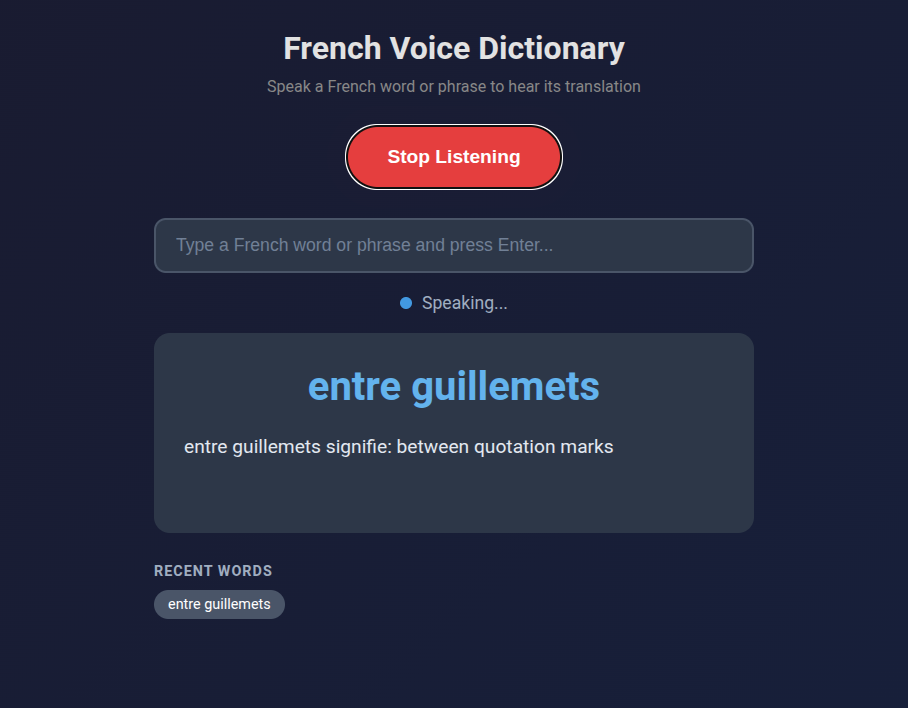
Phrases work too. “Entre guillemets” yields “between quotation marks.” That was a phrase that’s been rattling through my head because I hear it a lot on television (the news recently). Saying “dispositif de secours” gives me “backup device.” If I’m somewhere I can’t talk out loud, or the recognition is mangling my pronunciation on a specific word, there’s a text input as a fallback.
The whole thing runs on GitHub Pages. No server, no cost, and I can pull it up on my phone’s browser while I read.
Code Analysis
The app worked, but some points crept up that I’ve seen when reviewing PRs at work too.
Commenting
Almost every block has a comment. // State above the state variables. // DOM Elements above the DOM queries. // Check browser support above the browser support check. // Timeout fallback in case onend never fires (browser quirk) above the timeout fallback. // Estimate ~100ms per character at 0.9 rate, plus 2 second buffer above the math that does exactly that.
The system makes sense. The main issue with comments and documents is that it’s easy to make, impossible to maintain. If an LLM is able to make and update comments, and it helps as useful metadata for a downstream to read it, maybe it isn’t a problem. But in this instance, they describe what the next line does, not why. The kind of comments you’d delete in code review because the code already says it.
State Flags
The approach to concurrency was to add a boolean. Six flags at the top of the script: isListening, isProcessing, isSpeaking, pendingWord, lastProcessedWord, currentTTSTimeout. This is a three-state machine (listening, processing, speaking) implemented as a bag of independent booleans that have to be manually kept in sync. Every function checks two or three flags before deciding what to do. It works, but it’s the kind of thing where adding one more feature means touching every function.
Tight Coupling and Separation of Concerns
handleWord() updates the UI, manages API calls, state flags, interrupt detection, TTS triggering, and history. Six jobs. There’s no separation between “figure out the translation” and “update the screen” and “manage the audio pipeline.” If you wanted to swap the translation API, you’d be editing the middle of a 60-line function that also handles the queue logic. The code reads top to bottom like a script, and to its credit, the flow is clear. But it’s procedural, not structured.
Though this one is counter to how I’ve normally seen its approach. When people code, I notice premature abstraction. Someone writes a data connector for a specific REST api, reasons they need to have one that actually should handle any number of internal APIs, or that it should be a general purpose data ingestion function, or more general purpose data provider function, … ultimately becoming a mess of overabstracted logic when a specific function would have fared better, even if there was theoretically some technical debt. AI usually flips this, making a bunch of concrete interconnected pieces that are nearly impossible to reason through. An AI can hold 15 objects in its mind while implementing a new change on a function, a human reviewer can’t.
Broken Features
Getting speech recognition to work was straightforward. Getting it to work continuously was a different story.
The first version worked fine for one word. Say “bonjour,” get a definition, great. Say a second word and nothing happened. The app looked alive. The button still said “Stop Listening,” the status dot was green. No response.
While the app processed a word (the API call, then the text-to-speech playback), a flag blocked all incoming speech. Anything I said during that window got dropped silently. No error, no feedback, just gone. And the browser’s text-to-speech onend event sometimes just doesn’t fire. Known quirk, no fix. When that happened, the flag stayed on forever and the app was bricked until I refreshed.
It got worse before it got better. At one point the microphone was re-prompting for permission on every recognition cycle. The app started catching its own TTS output and trying to look up its own definitions in an infinite loop. We didn’t just screw the pooch. Basically every dog in the neighborhood.
Problem Fixing Process
I asked the AI to analyze the problem first, and it nailed the diagnosis: six potential causes, correctly prioritized, with the right recommendation (let speech interrupt TTS). Then I told it to implement the fix.
It added three more state flags. lastRestartTime to throttle restarts. restartFailCount for exponential backoff. isStarting to prevent overlapping start attempts. The restart function went from 4 lines to 20, with timing checks, failure counters, and a “too many rapid restarts, stopping” error message. Net change: +41 lines.
This made things worse. More flags meant more edge cases, more timing windows where flags disagreed, more ways for the state to get stuck. I spent a 22-message session debugging the debugging.
The actual fix was the opposite: I deleted almost everything it had added. Removed all three new flags. Removed the backoff logic. Removed the duplicate word detection. The restart function went back to 4 lines. The real solution was simpler: stop the microphone during text-to-speech, restart it after. No timing, no counters, no tracking. The commit was -88 lines, +34 lines. The app ended up shorter than the initial generation despite having more functionality.
Same pattern with gender detection. The AI built a suffix-matching heuristic for French noun gender (words ending in “-tion” are feminine, “-age” is masculine) and used it to prepend “un” or “une” to translation results. The badge in the UI? Fine, helpful visual hint. Prepending articles to verbs and adverbs? Not fine. I told it to remove the article logic entirely. A heuristic accurate enough for a colored dot is not accurate enough for constructing grammar.
I tried adding English text-to-speech for the translation portion, so it would say “femme signifie” in French and then “woman” in English. Switching TTS languages mid-sentence didn’t work in any browser I tested. Killed it after one session.
Overall Patterns
Every correction I made was a deletion. The AI’s instinct, when something broke, was to add machinery. More flags, more tracking, more edge cases, ironically more brittleness. My instinct was to find the simpler fix that made the machinery unnecessary. At work I’ll often cherry pick/break up functions and use them, and sometimes the most sensible solution is to fail. It solved problems by building around them. I solved them by removing the complexity around them.
The initial generation is often good. It gets me from concept to working app in one prompt, and the architecture is readable even if it was tightly coupled. But the debugging revealed that consistent bias. It writes like someone who’s read a lot of code but hasn’t maintained any of it. “Will this work” at the expense of “will this be easy to change later.” A human coder understands their limited capacity to hold things in their head. It drives simpler and more robust solutions. If an AI has a million token context window, why engineer anything that is less efficient? It can always figure it out later.
For a side project I use on my couch while reading French novels, that’s completely fine. But if I were building something larger, I’d treat the output the way I’d treat a first draft as a way to challenge my initial approach. Sometimes the AI writes code in a way I’d never think of, but often in a way I should never think of. I’m working on understanding the 80% that works. The judo of redirecting the majority of the code into logical units that are easy to reason through and maintain.
It’s a personal project. I can read my book without stopping. That has to count for something.
Leave a Reply